


- US - English
- China - 简体中文
- India - English
- Japan - 日本語
- Malaysia - English
- Singapore - English
- Taiwan – 繁體中文

The GPU server you're using today won't be air-cooled tomorrow. For example, today’s air-cooled GPU systems can fill 8U of rack space, with 8 SSDs up front and enough airflow to keep everything in spec. With emerging servers, that same 8-GPU configuration drops to 2U because liquid cooling is a requirement.¹ Suddenly, those 8 SSDs aren’t tucked away in a spacious chassis anymore. They’re packed into a thermal environment where every watt of wasted heat is a problem.
This is the inflection point driving Micron’s liquid-cooled SSD design. Storage has to participate in the cooling loop. It can’t just be along for the ride. The Micron 9650 NVMe™ SSD, in the E1.S (9.5mm) form factor, was built from the ground up for exactly this.
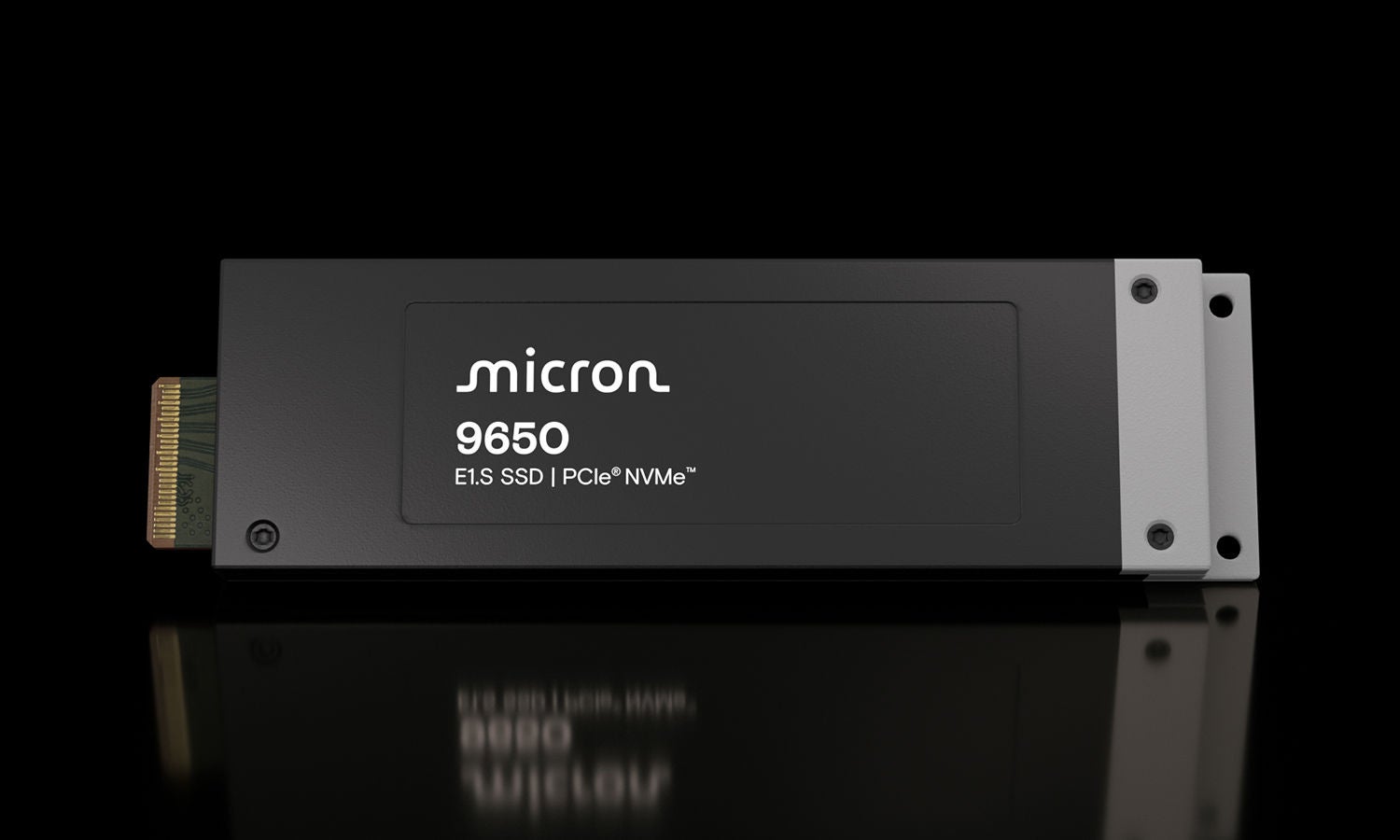
In this blog, I’ll walk through why liquid cooling matters for SSDs, how cold-plate cooling works, and what makes the single-sided architecture of the 9650 SSD the right design for cold-plate contact.
Click image to expand
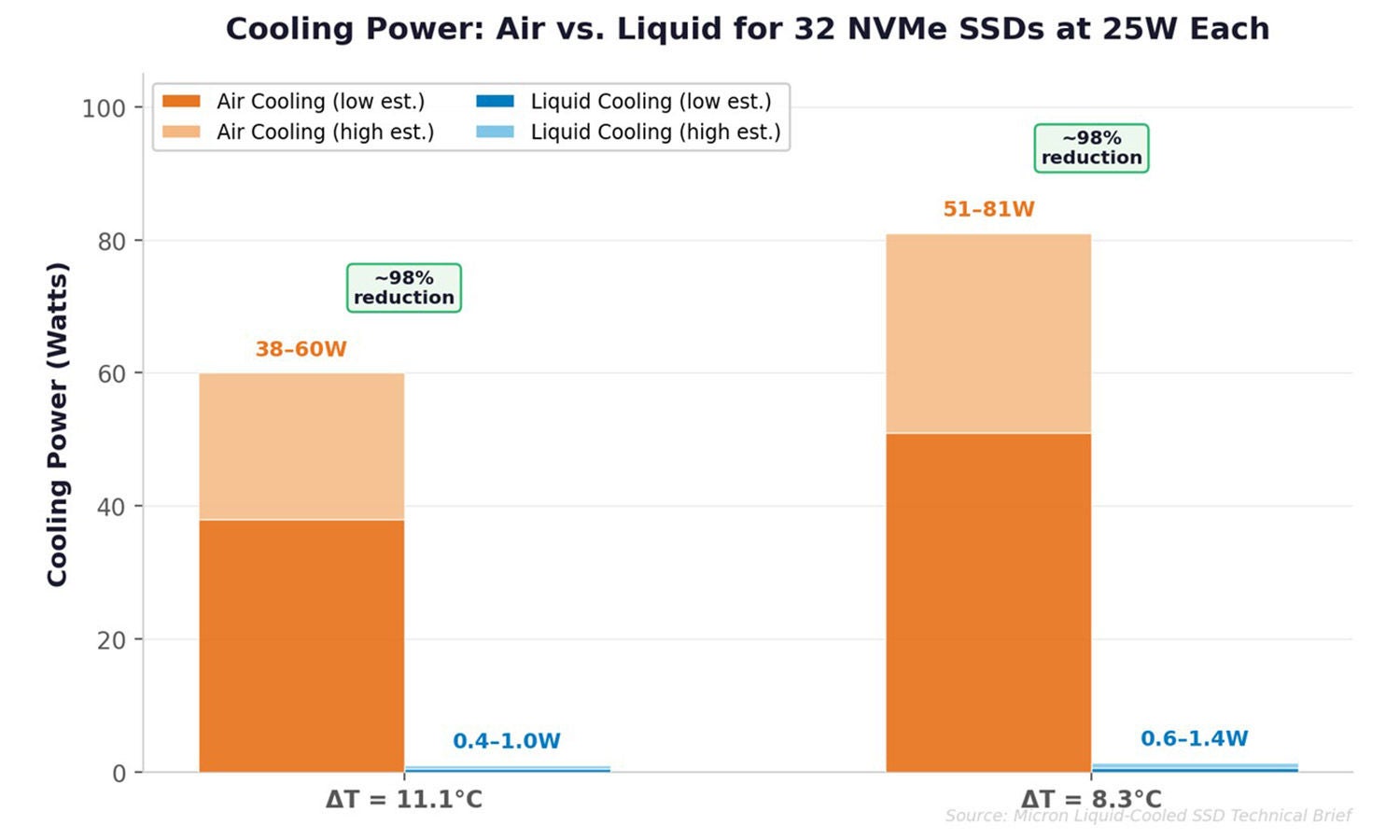
Figure 1: Air cooling requires 38–81W to move heat from 32 SSDs; liquid cooling does the same job at 0.4–1.4W — a ~98% reduction
First, some cool math
In our technical brief, we modeled a server with 32 NVMe SSDs at 25W each (800W total) across two temperature scenarios. We used standard heat transfer equations with realistic efficiency assumptions for both fan-driven airflow and pump-driven liquid cooling. We modeled a case where ambient datacenter temperature is 11.1°C different than the SSDs and where there’s a smaller delta at 8.3°C. If there is a larger delta in temperature, air cooling increases in efficiency, this also means that air cooling is more sensitive to changes in ambient data center temperature.
Click image to expand
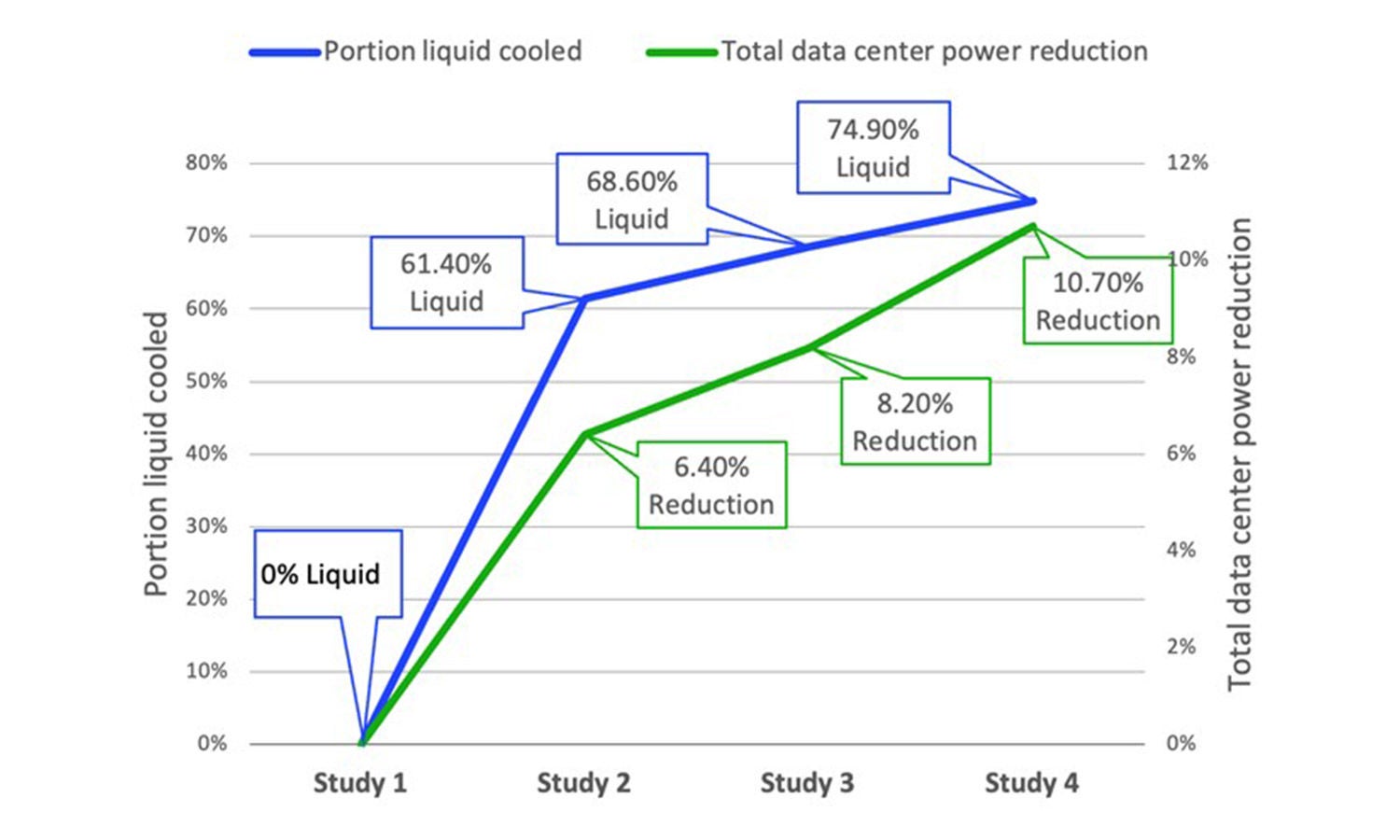
Figure 2: As liquid cooling adoption increases from 0% to 75%, total data center power drops by 10.7% (source: Vertiv)
A cold plate places a high-conductivity metal block and a fast-moving coolant close to the heat source, as close as feasible, rather than blowing air over a crowded drive bay. You’re lowering component temps while dramatically cutting the power it takes to move heat out of the server.
And it scales up. A Vertiv case study tracked four data center configurations as they increased liquid cooling adoption.² Going from 0% to 75% liquid cooling cut total facility power by 10.7%! Not just compute power, but everything: HVAC, fans, lighting, the works.
Click image to expand
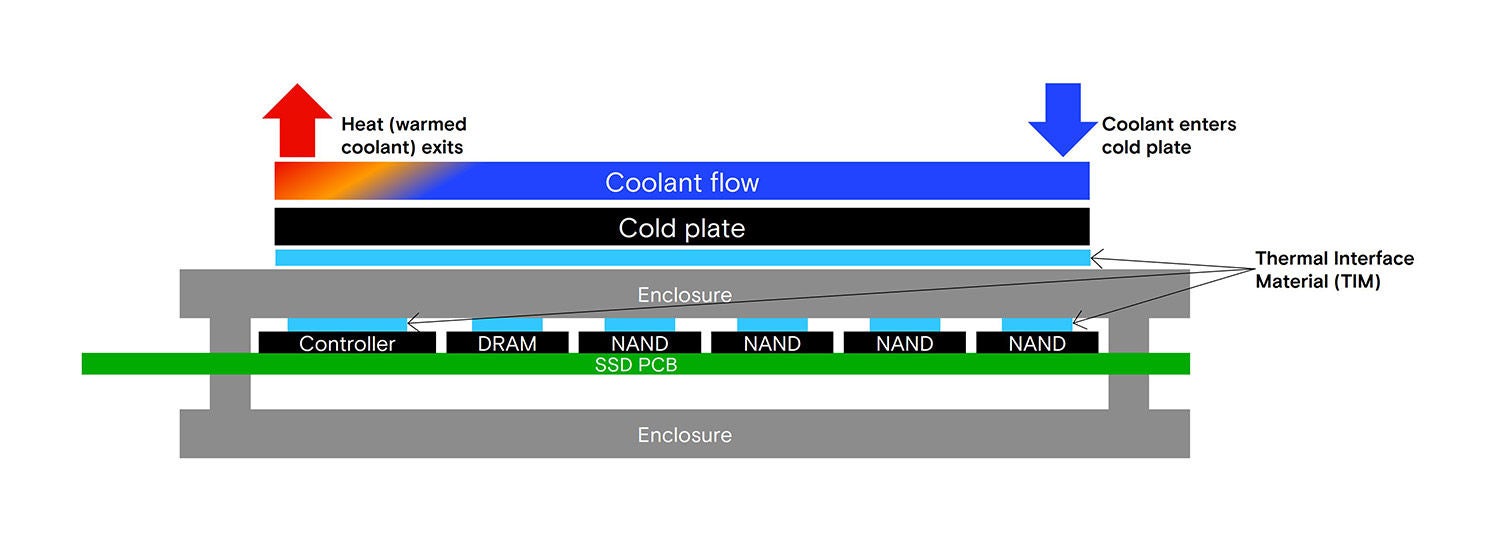
Figure 3: Cross-section of an SSD cold-plate assembly showing coolant flow, cold plate, TIM, and PCB with controller, DRAM, and NAND
How cold-plate cooling works for SSDs
A cold plate is a machined metal block with internal microchannels that mounts to the SSD enclosure via thermal interface material (TIM). A coolant like water-glycol flows through the plate, extracts heat directly at the device, and carries it to the facility cooling loop.
Modern implementations use spring-loaded cold plates with blind-mate, quick-disconnect manifolds. Pull a drive, the coolant lines disconnect automatically. Snap in a replacement, they reconnect. You keep full hot-swap serviceability, which is non-negotiable for enterprise and hyperscale deployments.
Click image to expand
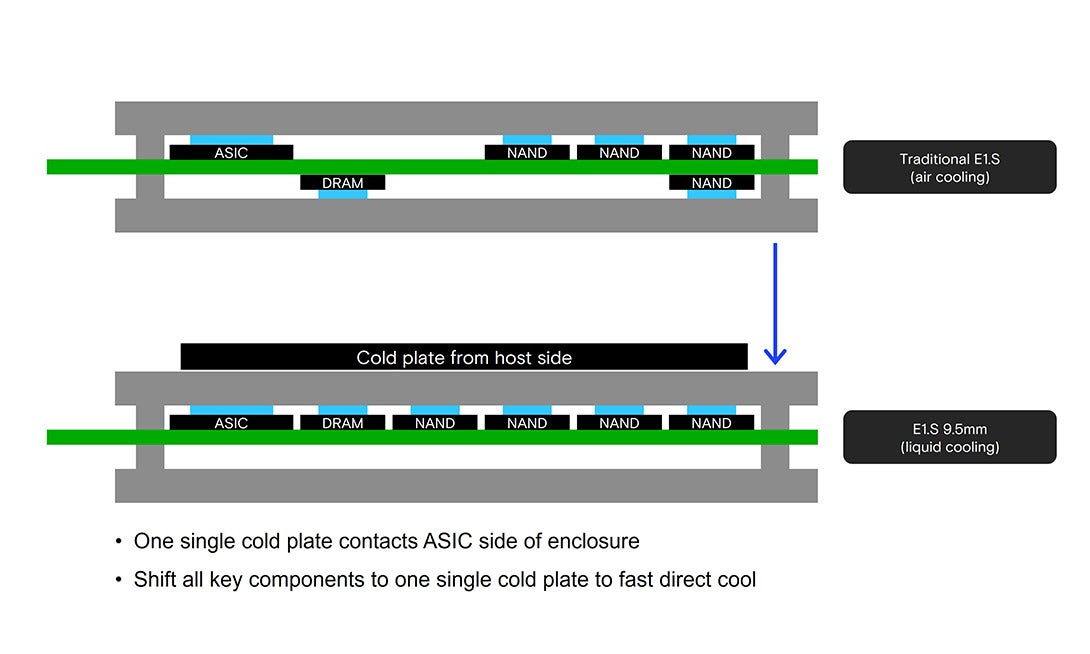
Figure 4: Conceptual design — double-sided (traditional E1.S) vs. the Micron 9650 SSD single-sided liquid cooling optimized design
The Micron 9650 NVMe Gen6 SSD – designed for liquid cooling
Conventional SSDs spread heat-generating components like the controller, DRAM, and NAND, across both sides of the PCB. If a cold plate only contacts one side the heat on the far side has to conduct through the PCB to reach the cold plate. That adds thermal resistance, hurts cooling efficiency, and creates temperature variation across NAND dies. The workarounds like dual cold plates, thicker enclosures, and secondary heat spreaders will add cost and complexity without fixing the root problem. This is a drive-level design issue, not a system-level plumbing issue.
The Micron 9650 SSD takes a different approach. You may have noticed in the diagram above — we concentrated ~90% of heat-generating components on one side of the PCB, compared to roughly 60% in typical designs. That one decision makes the rest of the cooling architecture work when coupled with a cold-plate:
- Direct cold-plate contact — Uniform thermal interface across the primary heat surface, minimizing thermal resistance
- Tighter NAND temperature uniformity — Less cross-die temperature variation improves endurance and reliability
- No throttling at Gen6 speeds — Thermal performance comparable to prior-gen Gen5 drives with liquid cooling, even at higher bandwidth and power
- Standard E1.S form factor — Hot-swap compatible in existing 9.5mm EDSFF liquid-cooled chassis
What changes at the system level
The drive-level design story matters, but the system-level payoff is where it gets interesting. When SSDs can participate in the liquid cooling loop instead of relying on their own airflow, system designers get options they didn’t have before:
- Fewer fans (or none) in storage zones: Fans that used to cool drives can be reduced or eliminated entirely, freeing up power and reducing acoustic load.
- Higher SSD density per server: Without airflow spacing constraints, you can pack more drives into less rack space.
- More predictable thermals under sustained AI workloads: Liquid cooling removes the variability that comes with shared airflow across GPUs, CPUs, and storage.
This isn’t theoretical. Ecosystem partners like Delta are already shipping fully liquid-cooled server platforms with integrated SSD cold plates.³ The Micron 9650 supports these configurations in E1.S (9.5mm) form factor, purpose-built for cold-plate environments. Industry thermal guidelines from ASHRAE TC 9.9 define the allowable temperature envelopes for data processing equipment,⁴ and liquid cooling enables operation well within recommended limits even at high drive densities.
There’s also an efficiency multiplier that’s easy to overlook. Liquid cooling is usually discussed in terms of thermal headroom, but the broader impact is on performance per watt. When you’re not burning power on high-RPM fans, and you’ve reduced system-level cooling overhead, those watts go back into usable power for other resources. The 9650 pairs its liquid-cooling architecture with meaningful performance-per-watt gains over prior generations, a direct input to both sustainability targets and total cost of ownership.
Looking ahead
Liquid cooling for SSDs is becoming a requirement in high-density AI infrastructure. The Uptime Institute’s 2024 Global Data Center Survey found that roughly 20% of operators are deploying or planning liquid cooling.⁵ The single-sided architecture of the Micron 9650 is purpose-built for cold-plate contact, and it’s what makes SSD liquid cooling actually work.
One more thing: when you give SSDs a better thermal envelope, you unlock room to get creative with controller clocks, write throughput, and sustained workload performance. We’re working on that, stay tuned.
For the full thermodynamic analysis, including airflow calculations and implementation details, see the Micron Liquid-Cooled SSD Technical Brief.
Learn more about the Micron 9650 NVMe SSD at micron.com/9650
References
- Vertiv, “The Impact of Liquid Cooling on Data Center Power Consumption,” 2024. Case study tracking four data center configurations from 0% to 75% liquid cooling adoption, demonstrating 10.7% total facility power reduction.
- Delta Electronics, “Liquid Cooling Solutions for Data Centers,” 2024–2025. Delta ships fully liquid-cooled server platforms with integrated cold-plates for CPUs, GPUs, and storage. See also: Dell PowerEdge XE9680L, HPE ProLiant DL384, and Supermicro liquid-cooled GPU server platforms.
- ASHRAE TC 9.9, Thermal Guidelines for Data Processing Environments, 5th Edition, 2021. Defines recommended (A1–A4) and allowable temperature envelopes for IT equipment in data centers.
- Uptime Institute, Global Data Center Survey 2024. Reports that approximately 20% of data center operators are deploying or actively planning liquid cooling infrastructure.